Mean Calculator with Frequency
Enter values with their frequencies — or grouped classes with midpoints — and get the mean with the Σf·x table shown.
Mean from a frequency table
When data arrives already counted — a tally of how many students scored each mark, how many days saw each temperature — there is no need to type every value out. A frequency table pairs each value (x) with its frequency (f), and the mean can be rebuilt from the table alone. This calculator takes the table directly, in two modes: plain values with frequencies, and grouped classes (ranges like 0–10) for data that only survives in grouped form.
Mean formula with frequency (Σf·x ÷ Σf)
For each row, multiply the value by its frequency (f·x). Add all the f·x products, add all the frequencies, and divide the first total by the second.
How to calculate it step by step
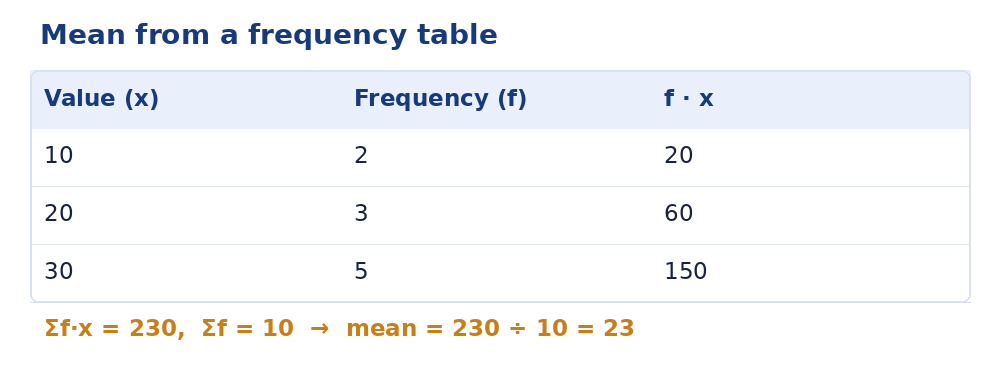
Worked example — values 10 (×2), 20 (×3), 30 (×5):
Step 1 — Multiply each value by its frequency. 10 × 2 = 20 · 20 × 3 = 60 · 30 × 5 = 150.
Step 2 — Add the products. Σf·x = 20 + 60 + 150 = 230. This is just the sum of all ten original values, reconstructed.
Step 3 — Divide by the total frequency. Σf = 2 + 3 + 5 = 10, so the mean is 230 ÷ 10 = 23. The full classroom method — including converting a raw list into a table — is in our guide on calculating the mean from a frequency table.
Grouped data and class midpoints
Grouped data keeps only ranges: classes 0–10, 10–20, 20–30 with frequencies 3, 5, 2. The individual values are gone, so each class is represented by its midpoint — (0 + 10) ÷ 2 = 5, 15 and 25. The same formula then runs: Σf·x = (3 × 5) + (5 × 15) + (2 × 25) = 15 + 75 + 50 = 140, and Σf = 10, giving an estimated mean of 14. Switch the calculator to the Grouped classes tab to try it — midpoints are filled in automatically and can be edited if your course uses a different convention.
Why the grouped mean is an estimate
The midpoint pretends every value in a class sits at its centre. Real values bunch and drift inside their classes, so the grouped mean is close to — not exactly — the true mean. The wider the classes, the rougher the estimate. That is a property of the surviving data, not of the arithmetic: with the raw values, the mean calculator gives the exact figure, and the two answers for the same data usually agree to within a unit or so.
From a raw list to a table
Frequency tables usually start life as raw lists. Take the twelve scores 70, 80, 80, 90, 70, 90, 80, 90, 100, 90, 80, 90. Count each value: 70 appears twice, 80 four times, 90 five times, 100 once — that tally is the frequency table. Its mean: Σf·x = (70 × 2) + (80 × 4) + (90 × 5) + (100 × 1) = 140 + 320 + 450 + 100 = 1,010, and Σf = 12, so the mean is 1,010 ÷ 12 ≈ 84.17 — identical, of course, to averaging the raw list directly (the mean calculator will confirm it). The table is the list, compressed; the formula is the mean, uncompressed back.
Frequently asked questions
How do you find the mean from a frequency table?
Multiply each value by its frequency, add those products, and divide by the total frequency: 230 ÷ 10 = 23 in the example above.
Why is the grouped-data mean only an estimate?
The original values are lost inside the class ranges, so the calculation uses each class midpoint as a stand-in.
What does Σf·x mean?
The sum of (frequency × value) over every row — the total of all the values in the data set, reconstructed from the table.
Can frequencies be percentages?
They work out the same way if they are consistent — the formula divides by Σf, so frequencies of 20%, 30%, 50% give the same answer as 2, 3, 5. Enter them as plain numbers (20, 30, 50) in the frequency column.
What if a value appears zero times?
Leave the row out entirely — a frequency of 0 contributes nothing to either sum, and including it only clutters the table.