Five Number Summary Calculator
Paste your numbers to get the minimum, Q1, median, Q3 and maximum — plus the IQR, outlier fences and a live box plot.
Separate values with commas, spaces or line breaks — a column pasted from Excel or Google Sheets works as-is. Anything that is not a number is ignored, never counted as zero.
What is the five number summary?
The five number summary condenses a whole data set into five landmarks: the minimum, the first quartile (Q1), the median, the third quartile (Q3) and the maximum. Together they show where the data starts and ends, where its middle sits, and how the middle half is spread — and they are exactly the five numbers you need to draw a box plot. This calculator goes one step further and adds the interquartile range, the outlier fences and any outliers themselves, all from one paste.
How to find Q1 and Q3
Step 1 — Sort the data and find the median. Step 2 — Q1 is the median of the lower half of the data (the values below the median). Step 3 — Q3 is the median of the upper half.
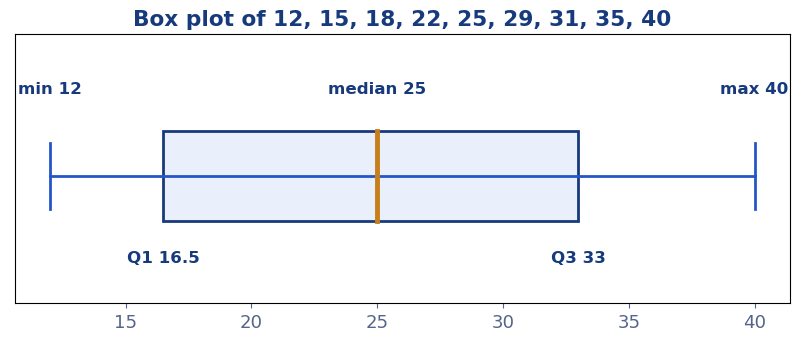
Worked example — 12, 15, 18, 22, 25, 29, 31, 35, 40: the median is 25. The lower half (12, 15, 18, 22) has median (15 + 18) ÷ 2 = Q1 = 16.5; the upper half (29, 31, 35, 40) has median (31 + 35) ÷ 2 = Q3 = 33. So the summary is 12 · 16.5 · 25 · 33 · 40. Small print: textbooks use a few slightly different quartile conventions for tiny data sets; this calculator uses the median-of-halves method above, and the steps panel always shows the halves so you can follow — or adjust — the working.
What is the interquartile range (IQR)?
For the example: 33 − 16.5 = 16.5 — the width of the middle half of the data.
The IQR is the spread measure that outliers cannot touch: it only spans the central 50% of values. Report it alongside the median whenever data is skewed — "median 25, IQR 16.5" tells a reader far more than a mean dragged around by extremes. The five number summary guide explains quartiles and box plots from first principles.
Outliers and the 1.5 × IQR fences
The standard rule (Tukey's) draws two fences: lower fence = Q1 − 1.5 × IQR and upper fence = Q3 + 1.5 × IQR. Any value outside the fences is flagged as an outlier. For the example: lower fence = 16.5 − 24.75 = −8.25, upper fence = 33 + 24.75 = 57.75 — every value lies inside, so there are no outliers. An outlier flag is a prompt to investigate, not an instruction to delete: it may be a typo, a broken sensor, or the most interesting value in the set. Our guide on what an outlier is covers the judgment calls.
Reading a box plot
A box plot draws the summary directly: the box runs from Q1 to Q3 with a line at the median, and whiskers reach to the smallest and largest values inside the fences (outliers are plotted as separate dots). A long box means a spread-out middle half; a median line near one end of the box means skew within the middle half itself. The box plot under the steps panel is drawn live from your results — paste your data and watch it rebuild.
Frequently asked questions
What are the five numbers in a five number summary?
Minimum, first quartile (Q1), median, third quartile (Q3), and maximum.
How do you find outliers with the IQR?
Values below Q1 − 1.5 × IQR or above Q3 + 1.5 × IQR are flagged as outliers. In the example above the fences are −8.25 and 57.75, so nothing qualifies.
How does this calculator find Q1 and Q3?
Sort the data, take the median, then find the median of the lower half (Q1) and the median of the upper half (Q3), not counting the median itself in either half.
What is the five number summary of 12, 15, 18, 22, 25, 29, 31, 35, 40?
Minimum 12, Q1 16.5, median 25, Q3 33, maximum 40 — with an IQR of 16.5.
What is a five number summary used for?
It is the data behind every box plot: five numbers that show the centre, the spread of the middle half, the full range, and — via the fences — any outliers, at a glance.